October 20, 2026
Please enter the email address you used when registering.
If you have a valid account with us, you will receive an email with instructions to reset your password.
Please try again later.
We’re committed to protecting the confidentially of personal information and use security measures and other safeguards designed to keep your personal information safe. Please choose a contact method below to receive a confirmation code:
Please enter the 6-digit code sent to your email. If you have not received a code, you may not have a registered account.
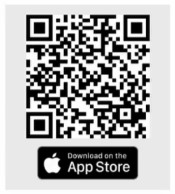
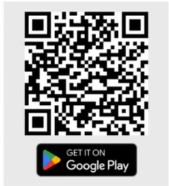
If you are new and ready to setup the Authenticator App for easier sign in experience next time. If you haven’t already, downloaded the Authenticator App on iOS or Android by scanning a QR code then click on "Set up Authenticator App". Do not close this browser window.
Now, open the Authenticator App and then on your app add account by scanning QR code or manually entering the code below to link your account. QR code expires after 15 minutes.
Do not close browser window. A security code is available in your Authenticator App, as you should have a new account in your App. If you don't have a code to enter, please click "Back" and set up the Authenticator App to get a new code.
Please try again later.
Enter your password to login.
We’re committed to protecting the confidentially of personal information and use security measures and other safeguards designed to keep your personal information safe. Please choose a contact method below to receive a confirmation code:
Enter the 6-digit code sent to your email
If you are new and ready to setup the Authenticator App for easier sign in experience next time. If you haven’t already, downloaded the Authenticator App on iOS or Android by scanning a QR code then click on "Set up Authenticator App". Do not close this browser window.
Now, open the Authenticator App and then on your app add account by scanning QR code or manually entering the code below to link your account. QR code expires after 15 minutes.
Do not close browser window. A security code is available in your Authenticator App, as you should have a new account in your App. If you don't have a code to enter, please click "Back" and set up the Authenticator App to get a new code.
Please try again later.
We’re committed to protecting the confidentially of personal information and use security measures and other safeguards designed to keep your personal information safe. Please choose a contact method below to receive a confirmation code:
Enter your password to login.
To verify your identity, we need to send an authorization code to the email address on file.
Enter the 6-digit code sent to your email
If you are new and ready to setup the Authenticator App for easier sign in experience next time. If you haven’t already, downloaded the Authenticator App on iOS or Android by scanning a QR code then click on "Set up Authenticator App". Do not close this browser window.
Now, open the Authenticator App and then on your app add account by scanning QR code or manually entering the code below to link your account. QR code expires after 15 minutes.
Do not close browser window. A security code is available in your Authenticator App, as you should have a new account in your App. If you don't have a code to enter, please click "Back" and set up the Authenticator App to get a new code.
Please try again later.
We need a phone number to keep your account secure. We will send you a code to validate your phone number.
Please enter the email address you used when registering.
If you have a valid account with us, you will receive an email with instructions to reset your password.
Please try again later.
We’re committed to protecting the confidentially of personal information and use security measures and other safeguards designed to keep your personal information safe. Please choose a contact method below to receive a confirmation code:
Please enter the 6-digit code sent to your email. If you have not received a code, you may not have a registered account.
If you are new and ready to setup the Authenticator App for easier sign in experience next time. If you haven’t already, downloaded the Authenticator App on iOS or Android by scanning a QR code then click on "Set up Authenticator App". Do not close this browser window.
Now, open the Authenticator App and then on your app add account by scanning QR code or manually entering the code below to link your account. QR code expires after 15 minutes.
Do not close browser window. A security code is available in your Authenticator App, as you should have a new account in your App. If you don't have a code to enter, please click "Back" and set up the Authenticator App to get a new code.
Please try again later.
Enter your password to login.
We’re committed to protecting the confidentially of personal information and use security measures and other safeguards designed to keep your personal information safe. Please choose a contact method below to receive a confirmation code:
Enter the 6-digit code sent to your email
If you are new and ready to setup the Authenticator App for easier sign in experience next time. If you haven’t already, downloaded the Authenticator App on iOS or Android by scanning a QR code then click on "Set up Authenticator App". Do not close this browser window.
Now, open the Authenticator App and then on your app add account by scanning QR code or manually entering the code below to link your account. QR code expires after 15 minutes.
Do not close browser window. A security code is available in your Authenticator App, as you should have a new account in your App. If you don't have a code to enter, please click "Back" and set up the Authenticator App to get a new code.
Please try again later.
We’re committed to protecting the confidentially of personal information and use security measures and other safeguards designed to keep your personal information safe. Please choose a contact method below to receive a confirmation code:
We have sent an email to {0}. Click the link in the email to finish setting up your dashboard
Please enter the email address you used when registering.
If you have a valid account with us, you will receive an email with instructions to reset your password.
Please try again later.
We’re committed to protecting the confidentially of personal information and use security measures and other safeguards designed to keep your personal information safe. Please choose a contact method below to receive a confirmation code:
Please enter the 6-digit code sent to your email. If you have not received a code, you may not have a registered account.
If you are new and ready to setup the Authenticator App for easier sign in experience next time. If you haven’t already, downloaded the Authenticator App on iOS or Android by scanning a QR code then click on "Set up Authenticator App". Do not close this browser window.
Now, open the Authenticator App and then on your app add account by scanning QR code or manually entering the code below to link your account. QR code expires after 15 minutes.
Do not close browser window. A security code is available in your Authenticator App, as you should have a new account in your App. If you don't have a code to enter, please click "Back" and set up the Authenticator App to get a new code.
Please try again later.
Enter your password to login.
We’re committed to protecting the confidentially of personal information and use security measures and other safeguards designed to keep your personal information safe. Please choose a contact method below to receive a confirmation code:
Enter the 6-digit code sent to your email
If you are new and ready to setup the Authenticator App for easier sign in experience next time. If you haven’t already, downloaded the Authenticator App on iOS or Android by scanning a QR code then click on "Set up Authenticator App". Do not close this browser window.
Now, open the Authenticator App and then on your app add account by scanning QR code or manually entering the code below to link your account. QR code expires after 15 minutes.
Do not close browser window. A security code is available in your Authenticator App, as you should have a new account in your App. If you don't have a code to enter, please click "Back" and set up the Authenticator App to get a new code.
Please try again later.
We’re committed to protecting the confidentially of personal information and use security measures and other safeguards designed to keep your personal information safe. Please choose a contact method below to receive a confirmation code:
Now in its second year, the Longevity Preparedness Index (LPI) points to a consistent pattern: awareness is there, but action is lagging.
Our 11th annual study of American workers offers insight to help you create aha moments that inspire employees to plan for a better retirement.
See how contribution rate, accumulation period, and investment choice can influence retirement readiness and shortfall risk.
Our latest research reveals why awareness alone won't improve retirement outcomes.
We’re investing $350 million in a global platform that's driving research, innovation, advocacy, and community partnerships.
Most people want to stay in their home as they age, but only 18% have taken steps to prepare for changing needs. We partnered with the Milken Institute to examine this critical issue.
October 20, 2026
September 28, 2026
August 13, 2026
The LPI was conducted online and by phone interview in English, sourced through the NORC AmeriSpeak Panel. The sample was a US representative sample comprised of 1,340 Americans, aged 18 and up, with specific oversamples of Non-Hispanic Black panelists, Hispanic panelists, and Non-Hispanic Asian American and Pacific Islander panelists to ensure adequate sample size for sub-group analysis. During analysis, survey responses were weighted to represent the US population. Survey data were collected from May 8th, 2026, to May 26th, 2026.
LPI scores can range from 0 (not at all prepared for longevity) to 100 (completely prepared for longevity). The overall LPI is composed of 8 domains. Each domain captures positive behaviors toward longevity preparedness and awareness of the importance of a domain. Domain scores are each calculated independently and can range from 0 to 100. All eight domain scores are averaged to calculate an overall LPI score.
The Longevity Preparedness Index was developed in collaboration with MIT Age Lab and funded by John Hancock. John Hancock provided financial support for the research but did not influence the findings, methodology, or conclusions. John Hancock is not affiliated with the Massachusetts Institute of Technology (MIT) AgeLab, and neither is responsible for the liabilities of the other.
This material is not an endorsement of any particular product, service or organization; nor is it intended to provide financial, investment, insurance, or health advice. It is intended to promote awareness and is for educational purposes only. This material and your Longevity Preparedness Index Score are provided solely for informational and educational purposes. Results are general in nature and do not account for your specific financial, health, or personal circumstances. You should not solely rely on score results when making decisions regarding future preparations and should independently evaluate your options and circumstances before taking any action.
MGR1026266053753